Showing posts with label asia. Show all posts

April 3, 2015

PSN Asia PS Plus IGC is once again, catching up with the others.


PSN Asia has revealed their IGC line-up for April 2015, all games will be claimable on 9th and will stay for a month until May 6th. As usual the line-up is a mix of new IGC (the same with the others region), old IGC, and out of nowhere IGC. Let's check the list:

  • PS4 Never Alone
  • PS4 Apotheon
  • PS4 OlliOlli2: Welcome to Olliwood
  • PS4 MouseCraft
  • PS3 BlazeRush
  • PS3 MouseCraft
  • Vita OlliOlli2: Welcome to Olliwood
  • Vita Killzone Mercenary
  • Vita MonsterBag
  • Vita MouseCraft
As you see above, PS3 only get two games, the least from all of them. So you might be dissappointed if you only have PS3 console. Anyway if you subscribe now, even with the 30 days subscription, you will be eligible to claim both the games above and all these games below (which are going to expire next week, on the same time the new games are live)

  • PS4 Oddworld: New ‘n’ Tasty
  • PS4 Valiant Hearts: The Great War
  • PS4 CounterSpy
  • PS3 Duke Nukem 3D Megaton Edition
  • PS3 Deadly Premonition: The Director's Cut 
  • PS3 CounterSpy
  • Vita CounterSpy
  • Vita Kick & Fennick
  • Vita Woah! Dave
We think this is not a great month being a PS Plus member, we hope the sales are more exciting.

Also, we apologise we are skipping the Spring Fever #5 in US PSN, simply because the sale is not interesting to us, since most of the item offered are DLCs. Nevertheless if you'd like to check by yourself, they have Batman games on lower price. See it here.

Confused how to make a purchase from PSN webstore? Read our step-by-step guide.

If you don't have HK PSN account yet, you can read our tutorial on how to set up a PSN account straight from your PCThe registration is free and open to everyone everywhere in the world, not limited to any nationality or place you live.

To purchase Plus membership, go here for USUKHK, or JP.
30 days membership starts at $10 for PSN US, or $8.8 for PSN UK, or $5 for PSN HK, or $4.3 for PSN JP.

You can purchase top-ups for your account from play-asia. See also our guide on how to top up your account from PC.


Deals currently ongoing:
  1. Batman sale in US PSN.
  2. Easter Sale in UK/EU PSN.
  3. Get one year of PS4 online multiplayer for only US$29.99. HK PSN account required.
  4. Play the addictive free game Fat Princess: Piece of Cake on your Vita or smartphone, finish level 15 and get the PS3 game Fat Princess free for life, available for US/UK/HK PSN account holder.
  5. As an addition to the official IGC, Uncharted 3 is re-offered as IGC for UK PSN Plus members. Not available on US/HK/JP PSN.
  6. Final Fantasy XIV (PS4/PS3) free to play for 14 days in UK and US PSN. 
  7. Sing popular song in English, or perhaps even Anime/Game songs and K-POPs at affordable price. Read our guide for Joysound TV Plus. You need Japanese PSN top-ups for this service.


follow our twitter @psnworldupdates

March 11, 2015

Some PSN updates


=================== PSN UK ======================

Either a pricing error or official price, Sleeping Dogs Definitive Edition (PS4) is definitely cheaper than its PS3 version on UK PSN, priced at just £9.49 (US$14.3), this is the cheapest Sleeping Dogs for PS4 at this moment. Since we don't know what makes the price so low, it could be that this is a pricing error. So if you want to take advantage you should do it quick. This has been confirmed as the deal of the week for PS4.


==================== PSN JP ======================


Japan-made Indie Hack and Slash game that was released on Steam, Croixleur, has its PS4 port released in JP PSN called Croixleur Sigma (Japanese Only) for 1500 Yen ($12.4) and will include its PS Vita version as well (will release later this year). If you are fans of the game, you may want to check this out. Also PS4/Vita version has additional characters and perks listed by Gematsu.

If the game above is not your style, you can also get the animated 2D fighting game Skullgirls Encore (PS3) from PSN JP for 770 Yen ($6.4). The price is only valid until April 1st Japan Standard Time. This game has full English support, we've tested it.

If you are fans of Japanese games on PSP you can check this link for the full list of games being offered on this sale. They are the best cheap games on Japanese PSN at this moment. Bear in mind that except for Skullgirls Encore, all other games are not guaranteed to carry English language option.

Legend of Heroes -Sen no Kiseki- got its DLC for sale this month. The DLCs are all crossbuy for PS3 and Vita version. It's a bit shame that the game itself is not cheap at 3400 Yen ($28).

=================PSN HK/Asia ===================

Jump to PSN HK, one interesting update is, the free-to-play quirky game Shake Spears! is now released in Asian region for PS3 and PS Vita. If you wonder why it entered our list? Well, it doesn't cost a dime and if you are a user with Asian PSN account, you can now use your own region to purchase add-ons, and no need to swap Vita memory card if you are using Asian account on your Vita.

Next! Marie Rose, Nyotengu, and Phase 4 character DLC price for Dead or Alive 5 (PS3) has at last been dropped to HK$30 on Asian PSN. Now they are priced just the same as standard characters. If you are playing DOA5 Ultimate or Core Fighters and have been waiting for these characters prices to drop, now is the time to buy. If you want to get all three of them, get the bundle at HK$77 here.

There are some discount for PS Plus members in Asian PSN, but most of the games that are under HK$100 are titles we are not familiar with. You may check them here.

If you don't have UK, JP or HK PSN account yet, you can read our tutorial on how to set up all these PSN accounts straight from your PCThe registration is free and open to everyone everywhere in the world, not limited to any nationality or place you live.

If your PSN account is a sub-account, you can now upgrade it into master account, only after your age turned 18. See this blog post for detail.

To purchase Plus membership, go here for USUKHK, or JP.
30 days membership starts at $10 for PSN US, or $8.8 for PSN UK, or $5 for PSN HK, or $4.3 for PSN JP.

You can purchase top-ups for your account from cdkeys and play-asia. See also our guide on how to top up your account from PC.


  Deals currently ongoing:
  1. Spring Fever Week #2 in US PSN
  2. Some updates in UK/HK/JP PSN.
  3. PS4 game deals and Rockstar games on sale in UK PSN.
  4. Final Fantasy Deals and Digital Discount part 4 also in UK PSN. 
  5. March games for PS Plus members has online. See here for US/EU JP, and HK PSN.
  6. Get one year of PS4 online multiplayer for only US$29.99. HK PSN account required.
  7. Play the addictive free game Fat Princess: Piece of Cake on your Vita or smartphone, finish level 15 and get the PS3 game Fat Princess free for life, available for US/UK/HK PSN account holder.
  8. As an addition to the official IGC, Uncharted 3 is re-offered as IGC for UK PSN Plus members. Not available on US/HK/JP PSN.
  9. Final Fantasy XIV (PS4/PS3) free to play for 14 days in UK and US PSN. 
  10. Sing popular song in English, or perhaps even Anime/Game songs and K-POPs at affordable price. Read our guide for Joysound TV Plus. You need Japanese PSN top-ups for this service.


follow our twitter @psnworldupdates

January 25, 2015

GUIDE: How to purchase games from JP PSN store on PC (w/ Pictures),also from US/UK/HK PSN


For many cross region gamers, the biggest challenge in JP PSN is one, registering yourself as a member on this store, and two, purchasing the games that you want. While we already wrote a guide for you to register yourself in JP PSN here, we have not written a guide for you to made a purchase from JP PSN. Well don't worry since in this post we are going to give you step by step of this purchasing process, not only for JP PSN, but also on US PSN, which apply as well to other English-language PSN Store such as UK and HK.

In this post we write how to really purchase a title from PSN store, from beginning until you register it for auto-download in your console. This post is not covering how to buy subscription, that will be in another future post, however you can use this one as a guide too, although indirectly.

Okay let's start, we opened one of our post, then choose a title that we wanted to buy. We imagine everyone would do the same, click on a title in order to see it on PSN store, either just to check or to purchase.

Before you start purchasing any titles from any PSN, you need to purchase top-ups, you can purchase them from play-asia. Read also our guide for topping up your PSN account from PC.


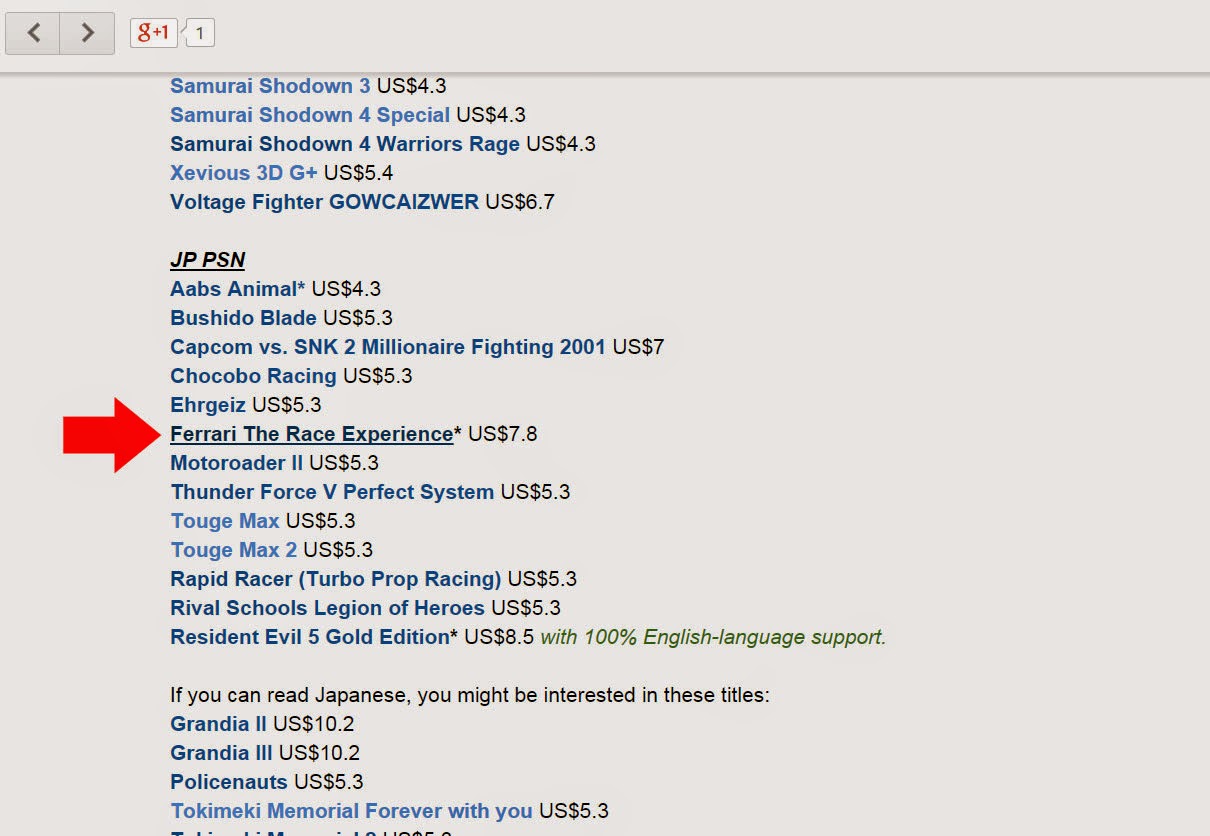
The title we choose is pointed with the big red arrow in the picture. If you wondering why we choose that, well, because this is quite an infamous title, so I am curious about it, especially since it was released on 2010 was never been once offered as a sale nor IGC, the price is alot cheaper in JP PSN (at the time of purchase), it is digital only, game is in English, and I am a fan of racing genre.


If you forgot to log yourself out since your last session, you will see screen like above, you have to sign out first and close the tab after it finished loading. You may need to click the link again in our post after that. If you don't see screen like above, skip this.


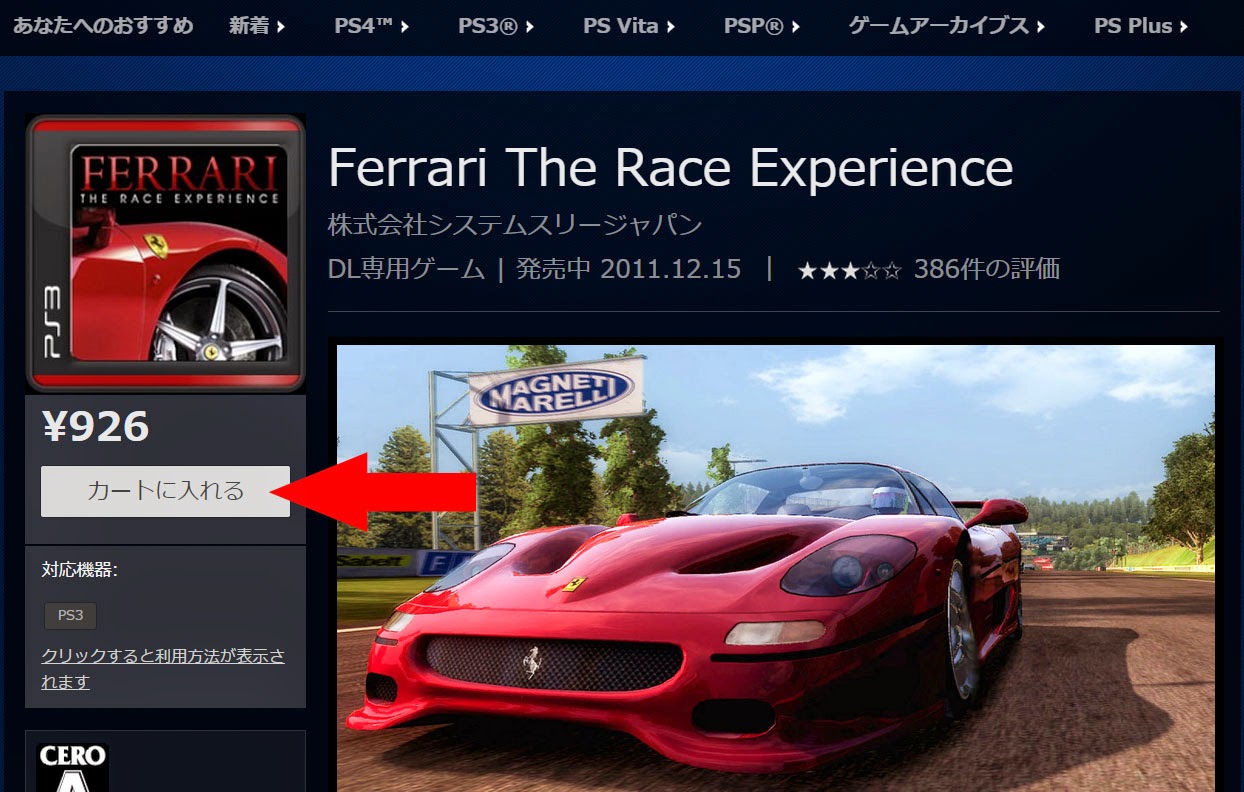
Okay we are now arrive at the game page. Click on the button pointed by red arrow to add it to cart/basket.


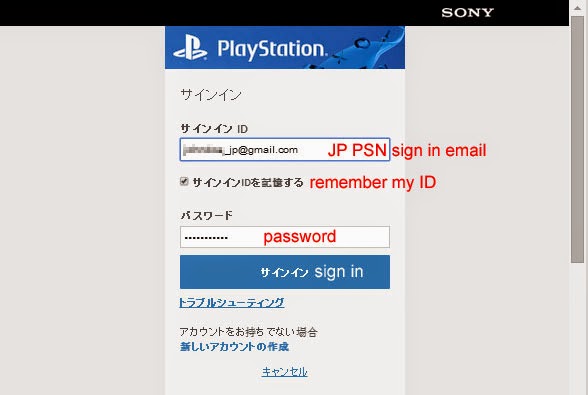
If you haven't signed in, the next screen will prompt you your login. If you don't see it, skip this step.
This title is in JP PSN, so I write my email that is linked to the JP PSN account, and yes you can sign in to Japanese account from US or any PSN Store. It will redirect you to the Japanese store afterward. 


If the game is successfully registered into your cart/basket, you'll see a pop up like above. You can either choose to continue browsing the store or immediately see your cart/basket to complete this purchase.


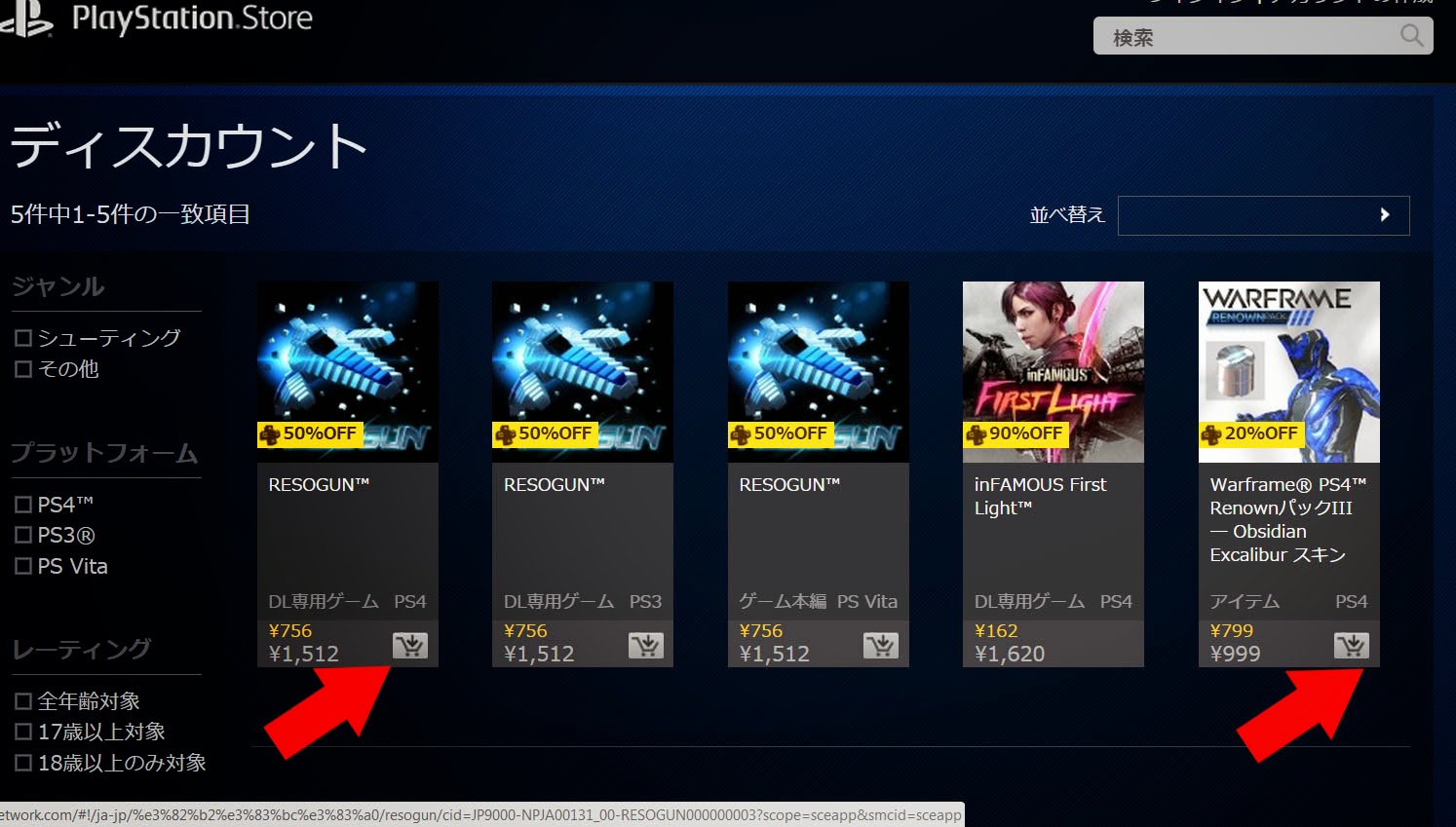
In case you are looking for another titles, you can just click the cart button on lower right on each titlebox, pointed by red arrow above. Some titles that has no this button may only be available for single transaction and may not be combined with any other items. To see your cart, click the mini cart logo just next to your login ID in upper right of the screen, it is cropped out from the picture above though.

This is your cart, you can enter a 10 digits promotional code if there are any, don't forget to click apply afterwards. If there are no codes, just click next. It is the greyish button with the longest Japanese text.


If your promotional code is valid, you'll see a screen like above. Just click next. If you have no codes, skip this step.


Press the purchase button to.. well.. purchase


Depends on your security setting, you might be asked for your password again, just type in again. If it is not asking you, skip this step.


Done! That's it! In my case I've just got for myself the cheapest Ferrari The Race Experience on PSN Store. A title that almost never being offered in sale. Anyway, to make your console downloading the game you've bought automatically, click the button pointed by the red arrow, press each button for one you'd like to download.

Afterward, just turn on your console and sign in as JP PSN account, and the magic happens.


Although the purchase process is done, don't forget to sign yourself out. Or otherwise you can't see the content of PSN Stores in the other regions.

NEXT: we also have some games to get from US PSN, we documented it too as a guide for you to purchase from any English PSN Stores, including US/UK/HK PSN that we prominently featured.

Only for UK/US PSN stores, you can purchase the top-up codes in Poundsterling or US Dollar from CDkeys.com, the advantage is clear, most of the price are lower than the face value and it is payable with Paypal. So these should be your first option. If you think it is troublesome, you can also buy it from play-asia. Here again the link to our guide for topping up your PSN account from PC.

  
========================================================


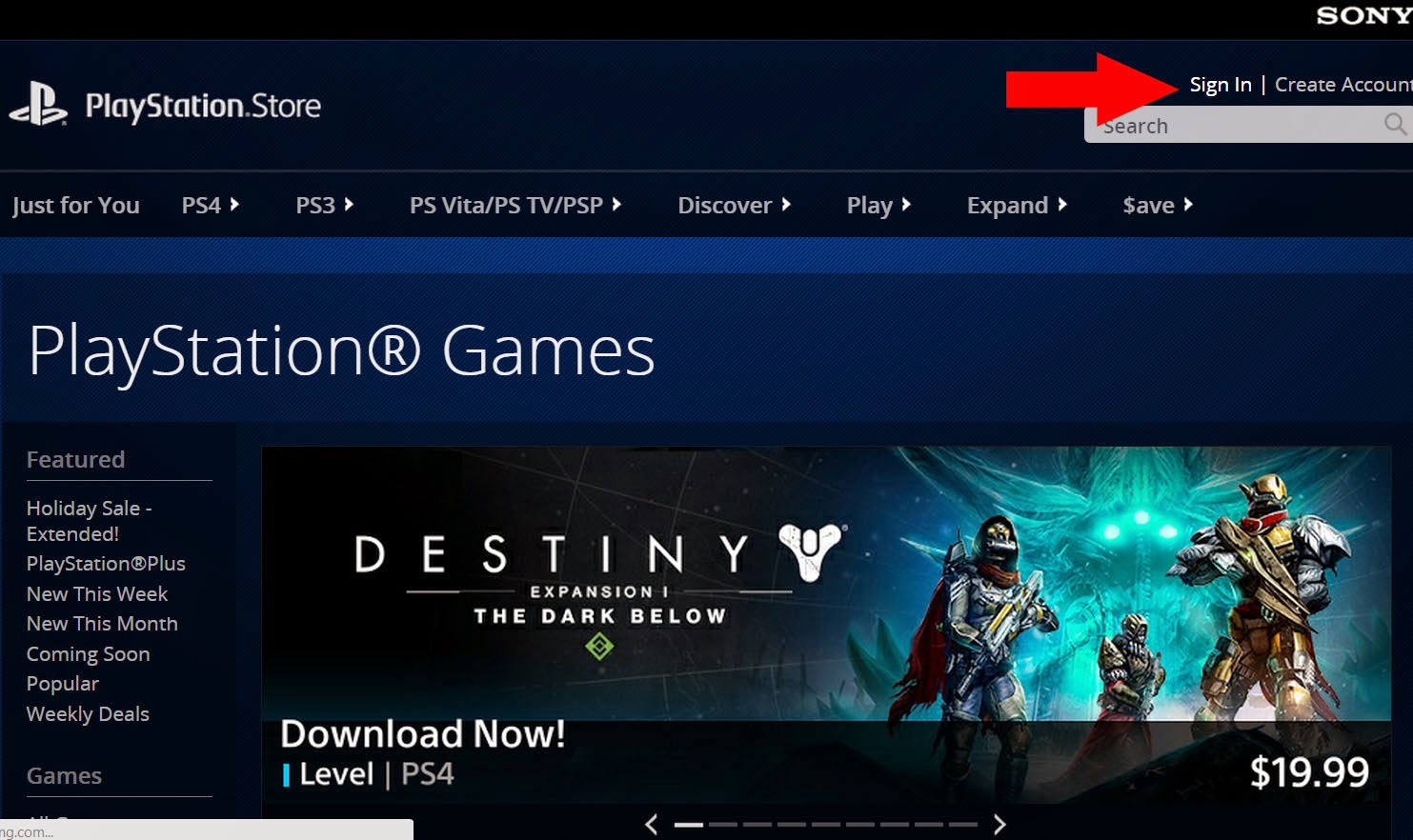
Assuming you're not logged in, click Sign In in the top right part. The JP PSN display this in exactly the same position written in Japanese.


Type in your Login ID and password. We are going to purchase something from US PSN, so we use US PSN account.

To put a game in your cart/basket, just click the little cart button.


If you opened a game page, clicking the Add to Cart/Basket does the same thing.


Once you added the game into your cart/basket, you'll see this pop up. You can either continue browsing another title or show your cart to checkout immediately.


If your game is crossbuy and you try to add the other version into your cart, you'll see an error message like above. In our case we added the PS3 version of The Unfinished Swan, then clicked the PS4 version and we got this message, it means we can't purchase the PS4 version since it is already bundled with our PS3 version.

Anyway, after you are done putting everything into your cart/basket, click the mini cart icon (not shown on this picture) on top right of the PSN Store homepage to show your cart, it is next to your ID.

If you have a promotional code, insert here. Then click apply afterward.


If your code is valid, the screen will show the calculation and price after discount. Click proceed to checkout if everything is no problem.

Click confirm purchase to err.... purchase.

Depends on your security setting, you might be asked for your password again, just type in again. If it is not asking you, skip this step.

You'll see a big thank you from PSN store for giving them money. As you see we actually backtracked and removed one game from above. So in the end we only purchased 3 titles. Click Download to your PS4/PS3 to download the game into your consoles.

Afterwards, turn on your console and sign in to the PSN account you've just used to purchase. Our example above is US PSN, so we are signing in to our US PSN on our PS3, and the magic happens.


The purchase process is done, but never forget to sign yourself out. Or otherwise you can't see the content of PSN Stores in the other regions.


January 3, 2015

GUIDE: How to Top-Up your PSN account from PC (with Pictures)


Being a cross region PSN gamer (or we call it Gamer Without Border) means you have to rely on prepaid cards rather than PayPal or Credit Cards, furthermore you will be likely using PC/Laptop a lot for purchasing those cards. Luckily, just like how you can register yourself a PSN account from computer web browsers, you can also Top-Up your account from browsers as well.

Follow the step by step guide below on how to Top-Up your PSN account from PC, we provide the detailed method for Japan PSN since it is not in English and will benefit a lot from pictures tutorial. Top-up method for US/UK/HK PSN is exactly the same and in English. We provide pictures of those in the last part of this post.


Open any PSN stores, or just click this link. You can sign in to any regions of PSN store from any PSN stores.

You will see PSN store just like above. If you are logged in, you need to log yourself out first. If you are not logged in yet, skip this.

 Now click Sign In in top right part of the site.

Enter the email that is linked to the PSN account you want to top-up, our example here is Japanese account. Yes you can sign in to Japanese account from US PSN Store. It will redirect you to the Japanese store afterward.


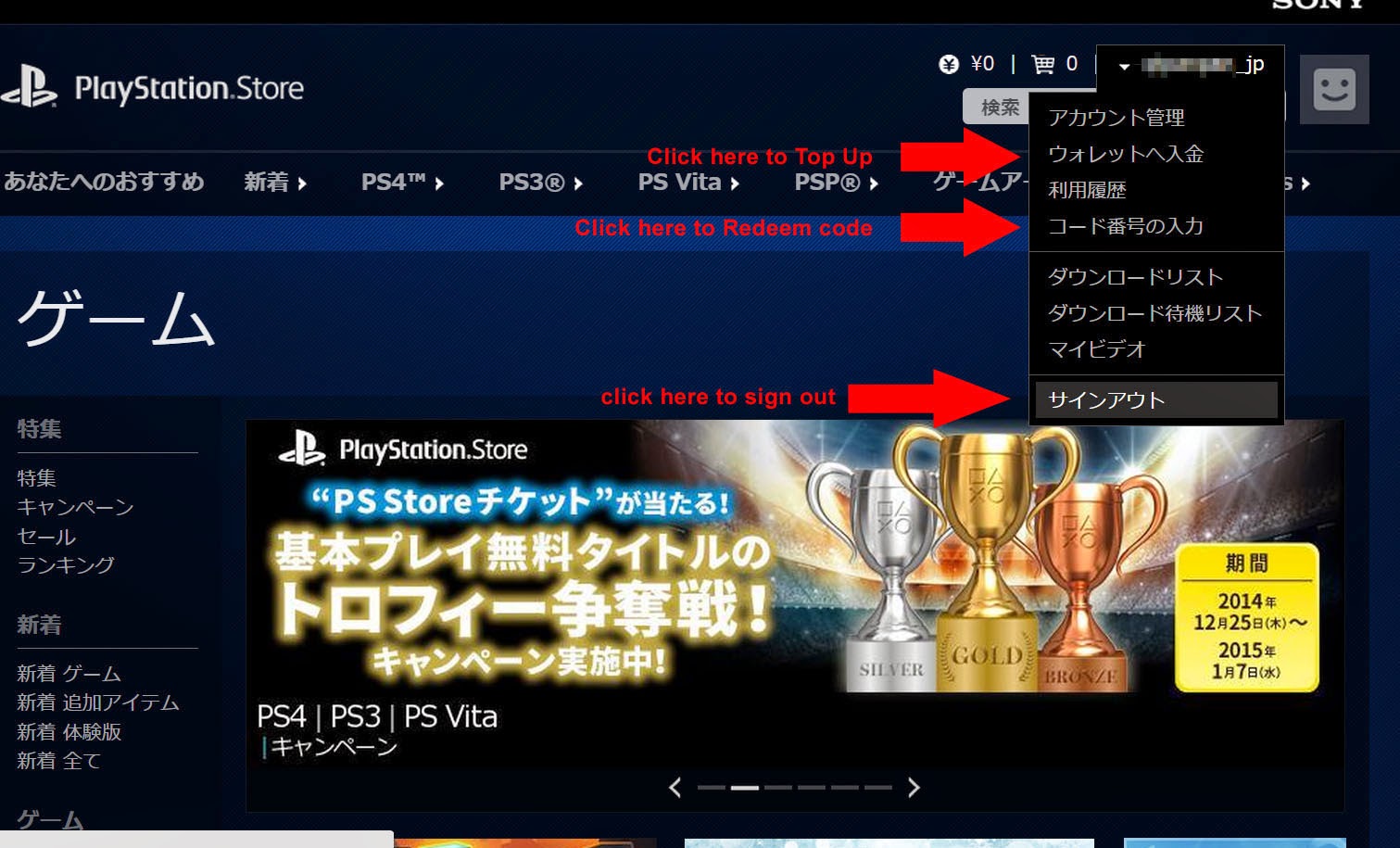
 Now you are in Japanese PSN Store. Click on your username ID on top right and select the second or fourth option (to top-up / to redeem code). Click on your balance or choose the fourth option from drop down list under your ID. The UK/US/HK PSN is exactly the same except that they are in English.


PSN will open a new tab automatically. You may or may not need to enter your password again (no need to reenter your ID). The screen may be in Japanese, so see the picture for guide. The UK/US/HK PSN are similar except that they are in English.


 If you clicked on your balance or choosing the second option from drop down list, you will arrive at this screen. If you choose the fourth option, skip this part. Depends on your regions you might see more or less icons, you might see Paypal payment etc. But in the Japanese Store would be like the screenshot above. Choose the one with gift box icon.  The UK/US/HK PSN is again extremely similar except that they are in English.


 Type in your 12 digits alphanumeical code that you have purchased. Small or Capital letters are the treated the same. If you have no idea where to buy the prepaid value codes. Go to play-asia.com. Remember that code are divided into countries rather than regions, so that code in Euro cannot be used in UK PSN, who are using Poundsterling. As far as we know, Spain and Germany who both uses Euro also cannot use each others code.


If your code is valid, you will see a screen like above where you can see your current balance added with prepaid value you bought. Remember that this is only a confirmation screen. Your account hasn't topped up yet, you still need to click on the blue button to Top-Up. If you don't see this kind of confirmation screen after entering your code, that code might be invalid, contact the seller immediately.


After clicking the blue button, the site will redirect you back into the redeem codes page, just close this tab. You're done with it.

You have to refresh this tab and see your balance is already topped up.


For top-ups in US Dollar and Poundsterling, you can purchase them from cdkeys. The advantage of it is that they are selling some of the codes under the face value. You can snatch the 35 quids (sorry, Poundsterling) PSN voucher for just around £30 or even less, you can also like their Facebook page to get 5% more price cut. If you are having trouble, as the safest choice, you can purchase the voucher from Play-Asia.

And this is how to top-up your PSN account in English language (Apply to US/UK/HK or any other English language PSN)

 Again you may directly click on your balance or choose the second option, but the most direct way is choosing the fourth option which is to Redeem Codes.
 
You may or may not need to enter this again, if you do, just enter like usual.

 
 Type in your 12 digits alphanumeric voucher code.

You will see a confirmation screen just like above if your code is valid. If it isn't, contact the seller immediately. Just click the blue button and you are done. Refresh the PSN store in your other tab to refresh the value.


 And that's it. We hope this guide helped you.

See also our guide on:
GETTING AND USING JOYSOUND TV PLUS FROM JP PSN


follow our twitter @psnworldupdates

Happy New Year from PSN, 10% discount and PS Plus extension for all PSN users in all regions

Most of you probably remember that PSN was experiencing a severe downtime for several days on Christmas due to DDoS attack from Lizard Squad. Indeed this attack affected alot of users especially those who are specifically registering for PS Plus membership for the sole purpose of playing online. However, as a thank you gesture for being loyal, PSN is automatically extending Plus for 5 days to those whose membership are currently active and also a member at December 25th, the time when the attack occured. And for all other PSN members they will get 10% discount code valid for a limited specified time. More informations will be notified by PSN then.

This thank you gesture is happening in all four regions of PSN we cover (US/UK/HK/JP) so if you have account on these stores, you will receive a total of four 10% discount codes you can use once on each respective stores, though we don't think it can be accumulated even if you have two codes on the same region. If you are a Plus member at December 25th on these stores, expect to get your membership extended for 5 days from the current expiry date.

The discount code however may have limitation. Sony US and EU and Asia mentioned that the code valid on “blockbuster new releases, award winning indie games, game add-ons and season passes, and an enormous selection of TV and movies.” They didn't specify whether the code is valid for all game titles you want. Furthermore in PSN Japan, the code is announced as not valid for games with CERO Z specification (equals to Mature 18+ titles) and Movie Rentals. This may have to do with Japanese strict law requiring credit cards to purchase game with that rating but since there is no confirmation, we expect the same limitation apply in the other regions.

Having more than one discount code is one benefit of being a member on several PSN regions, so while you may missed the discount code this time, don't miss the other future deals by being a member on all four PSN regions. Read our tutorial on how to set up all four PSN accounts straight from your PCThe registration is free and open to everyone everywhere in the world, not limited to any nationality or place you live, you can also check the FAQ if you are in doubtYou can top-up your account from sites such as play-asia or cdkeys or pcgamesupply.

If you are subscribing Plus only for playing Online, Asian PSN has the world's cheapest price for 12 months membership, with just $34.6 on HK PSN and even $28.7 on ID PSN. While PSN Japan has the world's cheapest price for 1 month membership at $4.3. So unless you can find your local game stores or online stores selling Plus for less, you can always consider other regions as an option.


follow our twitter @psnworldupdates


December 20, 2014

Last chance to purchase Marvel vs Capcom Origins (and some other PS3 games) off US/UK PSN

UPDATE: This game has been delisted from US and EU region. You still can purchase it from Asian PSN. It is gone from Asian PSN as well.

Just after Sega's games After Burner Climax is going to be pulled off PSN this Christmas Eve, Capcom has announced that one of their game: Marvel vs Capcom Origins (PS3) will be pulled down too from US and UK PSN around same time. So if you are eyeing this game for quite a while you might want to get it now.

NOTE: Capcom only announced that the game will be pulled down from US and UK PSN, but there is no guarantee that the same game will still be available on HK PSN. Since the XBox Live Arcade version will be removed globally.

Here's the link to several PSN Store including the prices converted into USD, Clicking the country names will direct you into the Marvel vs Capcom Origins on each respective PSN Store. If you have account on several regions, you may choose which one suit you the best.


Prices are quoted in USD. Cheap prices are in green, overpriced are in red.
Region
Price
PS Plus Disc.
Game in English
America
$14.9
-
Yes
America
$12.9
-
Yes
America
$14.9
-
Yes
America
$11.7
-
Yes
America
$17.9
-
Yes
Europe
$18.7
-
Yes
Europe
$18.3
-
Yes
Europe
$12.7
-
Yes
Europe
$18.7
-
Yes
Europe
$19.7
-
Yes
Europe
$20.5
-
Yes
Asia
$15.1
-
Yes
Asia
$15.2
-
Yes
Asia
$14.8
-
Yes
Asia
$16.1
-
Yes
Asia
$14.3
-
Yes
Asia
$11.1
-
Yes
Japan
Japan
--
-

Please note that games purchased from PSN will always be available to re-download in the future from Purchased/Download List. The game is only unavailable to purchase.

There are also some rumours about games made by Activision being pulled off Steam (source).
There are no official statement about this so we still treat this as rumour. However, for conveniences if you want to purchase the games off PSN just in case they will be taken down too, here's the link.


Family Guy: Back to the Multiverse
US PSN $9.99 (currently on sale)
UK PSN £49.99
HK PSN N/A

Ice Age: Continental Drift: Arctic Games
US PSN N/A
UK PSN £49.99
HK PSN N/A

The Walking Dead: Survival Instinct
US PSN $49.99
UK PSN £39.99
HK PSN N/A


To create multi region PSN accounts, see our FAQ, it is long but the links are there. We will create our own tutorials in the future for more convenience.


follow our twitter @psnworldupdates